

Display Impact with Metafields
1ClickImpact automatically stores your cumulative impact stats in Shopify shop metafields. These update after every order and can be used to display your impact anywhere on your storefront.
Available metafields
The following shop metafields are maintained by 1ClickImpact:
- oneclickimpact.total_trees — Total trees planted (integer)
- oneclickimpact.total_ocean_lbs — Total ocean waste removed in pounds (integer)
- oneclickimpact.total_carbon_lbs — Total carbon captured in pounds (integer)
- oneclickimpact.total_donated_usd — Total amount donated in USD (decimal)
These values update automatically whenever new impact is triggered. No manual action is needed to keep them current.
Using metafields in your theme
Use Liquid code in your theme files to display impact stats wherever you want.
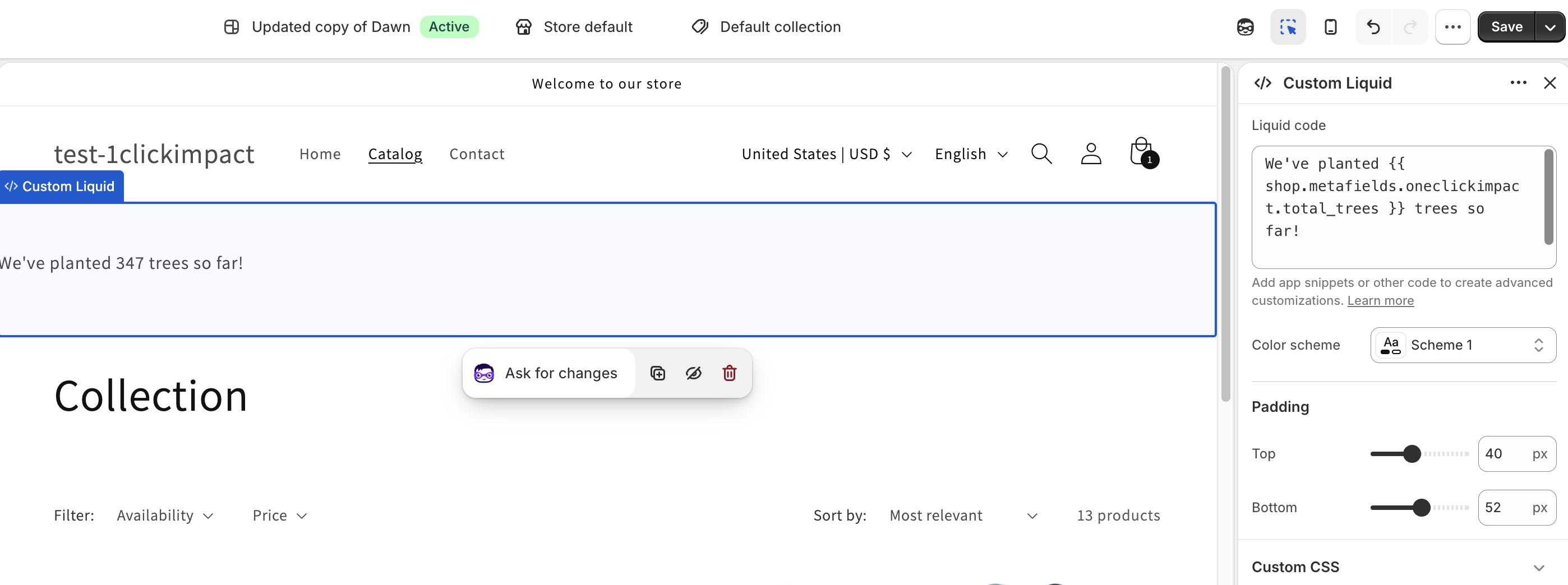
In the theme editor, add a Custom Liquid section and paste the code below.
Basic usage
{{ shop.metafields.oneclickimpact.total_trees }} trees planted
{{ shop.metafields.oneclickimpact.total_ocean_lbs }} lbs of ocean waste removed
{{ shop.metafields.oneclickimpact.total_carbon_lbs }} lbs of carbon captured
${{ shop.metafields.oneclickimpact.total_donated_usd }} donated to causes
Conditional display
Only show a metric if it has a value:
{% if shop.metafields.oneclickimpact.total_trees > 0 %}
  We've planted {{ shop.metafields.oneclickimpact.total_trees }} trees so far!
{% endif %}
Styled HTML block
A complete styled section you can drop into any template:
<div style="background: #f0faf0; padding: 24px; border-radius: 8px; text-align: center;">
  <h3>Our Environmental Impact</h3>
  <div style="display: flex; justify-content: center; gap: 32px; flex-wrap: wrap; margin-top: 16px;">
    {% if shop.metafields.oneclickimpact.total_trees > 0 %}
      <div>
        <strong>{{ shop.metafields.oneclickimpact.total_trees }}</strong>
        <br>Trees Planted
      </div>
    {% endif %}
    {% if shop.metafields.oneclickimpact.total_ocean_lbs > 0 %}
      <div>
        <strong>{{ shop.metafields.oneclickimpact.total_ocean_lbs }} lbs</strong>
        <br>Ocean Waste Removed
      </div>
    {% endif %}
    {% if shop.metafields.oneclickimpact.total_carbon_lbs > 0 %}
      <div>
        <strong>{{ shop.metafields.oneclickimpact.total_carbon_lbs }} lbs</strong>
        <br>Carbon Captured
      </div>
    {% endif %}
    {% if shop.metafields.oneclickimpact.total_donated_usd > 0 %}
      <div>
        <strong>${{ shop.metafields.oneclickimpact.total_donated_usd }}</strong>
        <br>Donated to Causes
      </div>
    {% endif %}
  </div>
</div>
Where you can use metafields
These metafields work in any context where Shopify Liquid is available:
- Homepage sections
- Product pages
- Notification emails (order confirmation, shipping, etc.)
- Packing slips
- Custom theme sections and templates
1ClickImpact also provides built-in widgets like the Impact Counter and Footer Banner that display your impact stats automatically without any code. Metafields are for stores that want full design control.
Some Shopify themes also support connecting these metafields via the dynamic source picker in the theme editor (look under Shop when editing a text field). Support varies by theme and block type.